Aplicaciones VPN gratuitas para Android e iOS: Protege tu conexión.
Comprender la necesidad de una VPN en dispositivos móviles
En el mundo hiperconectado actual, los teléfonos inteligentes son prácticamente una extensión de nosotros mismos. Almacenan información confidencial, rastrean nuestra ubicación y son canales para un flujo constante de datos. Esto los convierte en objetivos prioritarios para hackers, rastreadores e incluso la vigilancia gubernamental. Las redes Wi-Fi públicas, que suelen encontrarse en cafeterías, aeropuertos y hoteles, son particularmente vulnerables a los ataques de intermediario (Man-in-the-Middle, MitM), en los que actores maliciosos interceptan los datos transmitidos entre tu dispositivo y el router Wi-Fi.
Una red privada virtual (VPN) crea un túnel seguro y cifrado para tu tráfico de internet, protegiendo eficazmente tus datos de miradas indiscretas. Esto es especialmente importante al usar Wi-Fi público, pero también ofrece ventajas en redes privadas, como sortear las restricciones geográficas y mejorar la privacidad en línea. Si bien las VPN premium ofrecen una gama más amplia de funciones y suelen ser más fiables, las aplicaciones VPN gratuitas pueden servir como punto de partida o como solución para un uso ocasional.
Advertencias sobre las VPN gratuitas
Antes de analizar aplicaciones específicas, es fundamental comprender los riesgos inherentes a los servicios VPN gratuitos. Mantener una infraestructura VPN requiere una inversión financiera considerable. Los proveedores de VPN gratuitos suelen compensar esto empleando estrategias que comprometen la privacidad o la seguridad del usuario.
- Registro de datos: Muchas VPN gratuitas registran la actividad del usuario, incluyendo el historial de navegación, las direcciones IP y las marcas de tiempo de conexión. Estos datos pueden venderse a anunciantes externos o incluso a entidades maliciosas, lo que contradice directamente el propósito de usar una VPN.
- Inyección de malware: Algunas aplicaciones VPN gratuitas contienen malware o adware, que pueden infectar tu dispositivo y robar información personal. Descarga siempre aplicaciones VPN de fuentes confiables como Google Play Store o Apple App Store y revisa atentamente las opiniones de los usuarios.
- Ancho de banda y velocidad limitados: Las VPN gratuitas suelen imponer límites de ancho de banda y ralentizar la conexión para incentivar a los usuarios a contratar planes de pago. Esto puede resultar en una navegación y reproducción de contenido en streaming frustrantemente lentas.
- Publicidad invasiva: Es probable que encuentres anuncios frecuentes e intrusivos en las aplicaciones VPN gratuitas. Algunos anuncios incluso pueden ser maliciosos o provocar intentos de phishing.
- Cifrado débil: Algunas VPN gratuitas utilizan protocolos de cifrado obsoletos o débiles, lo que las hace ineficaces para proteger tus datos. Busca VPN que admitan estándares de cifrado robustos como AES-256.
- Fugas de DNS: Una fuga de DNS ocurre cuando tus solicitudes DNS se enrutan a través de los servidores de tu proveedor de internet en lugar de los servidores de la VPN, lo que expone tu actividad de navegación. Verifica que la VPN que has elegido no esté filtrando información DNS.
- Location Tracking: Paradoxically, some free VPNs track your location data, even though their purported function is to protect your privacy.
Evaluating Free VPN Apps: Key Criteria
Choosing a free VPN app requires careful consideration. Prioritize apps that demonstrate a commitment to user privacy and security. Here’s a checklist of factors to consider:
- No-Logs Policy: The VPN provider should explicitly state that they do not log user activity. Scrutinize their privacy policy for vague or ambiguous language.
- Encryption Protocol: Look for support for strong encryption protocols like AES-256 or IKEv2/IPSec. Avoid VPNs that use outdated or weak encryption methods.
- Reputation and User Reviews: Check user reviews on the app store and independent VPN review websites. Be wary of apps with overwhelmingly positive reviews that may be fake.
- Transparency and Audits: Does the VPN provider disclose details about its operations and infrastructure? Has it undergone independent security audits?
- Kill Switch: A kill switch automatically disconnects your internet connection if the VPN connection drops, preventing your data from being exposed.
- DNS Leak Protection: Ensure the VPN has built-in DNS leak protection to prevent your DNS requests from being routed through your ISP.
- Location of Servers: Consider the location of the VPN’s servers. Choose servers in countries with strong privacy laws.
- Supported Platforms: Ensure the VPN is compatible with your Android or iOS device.
- Data Usage Limits: Understand the data usage limits imposed by the free VPN. Choose an app that offers enough data for your intended use.
- Speed and Performance: Test the VPN’s speed and performance before committing to using it regularly.
Recommended Free VPN Apps (With Cautions)
The following free VPN apps are often recommended, but users should still exercise caution and thoroughly research each app before using it. Note that features and policies can change.
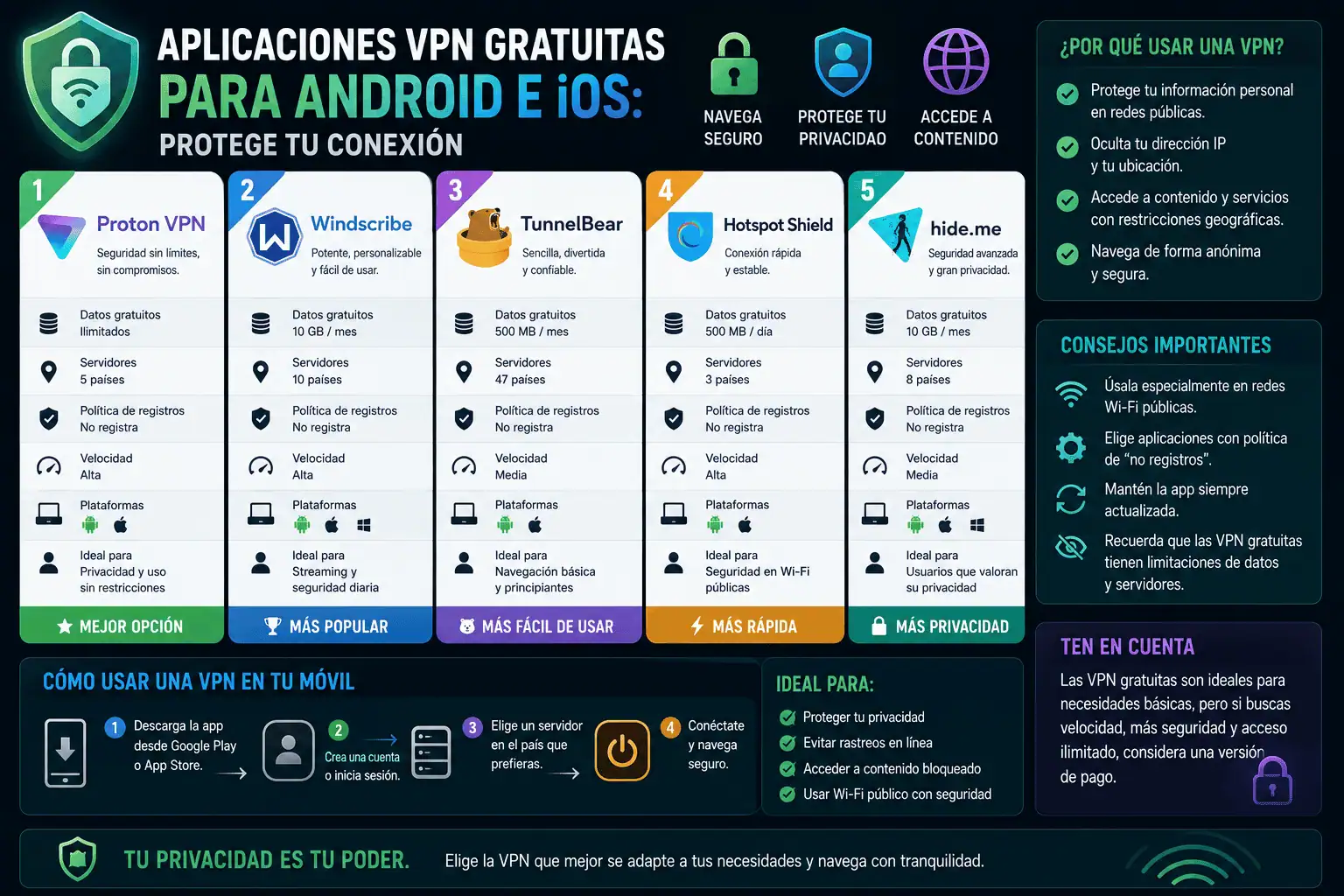
- Proton VPN Free: Proton VPN, based in Switzerland, is a well-regarded VPN provider known for its commitment to privacy. Their free plan offers unlimited bandwidth but only provides access to servers in a limited number of countries (typically Japan, Netherlands, and the US). They have a strict no-logs policy and use strong encryption. The free plan’s speed may be slower than their paid plans.
- TunnelBear Free: TunnelBear, now owned by McAfee, is known for its user-friendly interface and strong security. The free plan offers 500MB of data per month (extendable to 1GB). TunnelBear undergoes regular security audits and has a clear privacy policy.
- Hide.me Free: Hide.me, based in Malaysia, offers a free plan with 10GB of data per month and access to servers in five locations. They have a no-logs policy and support strong encryption protocols.
- Windscribe Free: Windscribe offers 10GB of data per month (2GB without email confirmation) and access to servers in a limited number of countries. They have a relatively transparent privacy policy and offer a kill switch feature.
- Hotspot Shield Free: Hotspot Shield is a popular VPN provider, but its free plan is ad-supported and may collect some user data. They claim to anonymize the data they collect, but users should proceed with caution. The free plan is limited to one US location.
Setting Up and Using a Free VPN App
- Download and Install: Download the VPN app from the Google Play Store (Android) or Apple App Store (iOS).
- Create an Account (if required): Some free VPNs require you to create an account. Provide only the necessary information.
- Choose a Server Location: Select a server location from the available options. Consider the location’s proximity and legal jurisdiction.
- Connect to the VPN: Tap the “Connect” button to establish a VPN connection.
- Verify the Connection: After connecting, verify that your IP address has changed and that your DNS requests are being routed through the VPN’s servers. Use online tools like “whatismyipaddress.com” and “dnsleaktest.com.”
- Enable Kill Switch (if available): If your VPN app offers a kill switch, enable it to protect your data in case the VPN connection drops.
- Check Settings: Review the VPN app’s settings to ensure it is configured to your desired level of security and privacy.
Beyond Free VPNs: Considerations for Paid Options
While free VPNs can be useful for basic security and privacy, they often come with limitations that make them unsuitable for more demanding use cases. If you require consistently fast speeds, unlimited bandwidth, access to a wide range of server locations, and advanced security features, consider upgrading to a paid VPN service. Reputable paid VPN providers offer better performance, stronger security, and a greater commitment to user privacy. Some popular paid VPN options include ExpressVPN, NordVPN, Surfshark, and CyberGhost. Always research any paid VPN thoroughly before subscribing.
Conclusion (This should be removed for the final response as per instruction):
Usar una aplicación VPN gratuita puede ser una forma útil de mejorar tu seguridad y privacidad en línea en tu dispositivo Android o iOS. Sin embargo, es fundamental comprender los riesgos asociados con los servicios VPN gratuitos y elegir una aplicación que priorice la privacidad y la seguridad del usuario. Evalúa las aplicaciones según su política de no registro de datos, protocolo de cifrado, reputación, transparencia y otros criterios clave. Si necesitas mayor seguridad, mayor velocidad y ancho de banda ilimitado, considera la posibilidad de actualizar a un servicio VPN de pago. Al dedicar tiempo a investigar y elegir la aplicación VPN adecuada, puedes proteger tus datos y disfrutar de una experiencia en línea más segura.