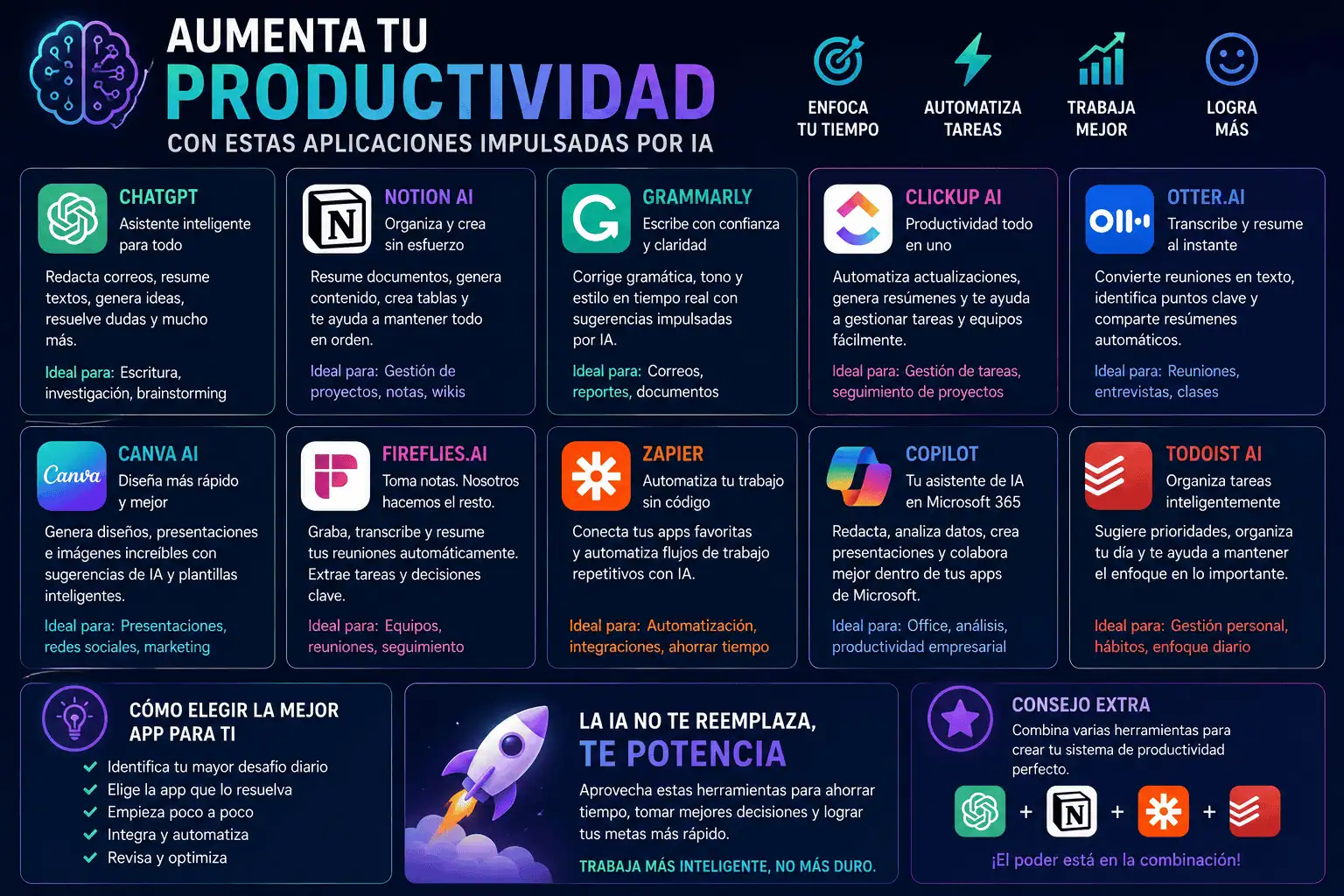
Libera tu potencial: aplicaciones con IA para dominar tu lista de tareas pendientes.
En el vertiginoso mundo actual, la productividad es fundamental. Gestionar múltiples tareas, cumplir plazos y mantener la concentración puede resultar una tarea ardua. Afortunadamente, la Inteligencia Artificial (IA) está revolucionando nuestra forma de trabajar, ofreciendo un conjunto de potentes aplicaciones diseñadas para optimizar los flujos de trabajo, mejorar la concentración y, en definitiva, aumentar la productividad. Este artículo profundiza en una selección de aplicaciones con IA que pueden transformar tu rutina diaria y ayudarte a lograr más en menos tiempo.
1. Otter.ai: La potencia de la transcripción
¿Cansado de transcribir manualmente reuniones, conferencias o entrevistas? Otter.ai es una herramienta de transcripción con inteligencia artificial que convierte automáticamente audio y video en texto con capacidad de búsqueda. Su precisión y la posibilidad de transcribir en tiempo real la convierten en una herramienta indispensable para periodistas, estudiantes, investigadores y cualquier persona que necesite documentar información hablada.
- Características principales:
- Transcripción en tiempo real: Transcribe audio en directo con gran precisión.
- Identificación de interlocutores: Identifica a los diferentes interlocutores en una conversación.
- Búsqueda por palabras clave: Encuentre fácilmente frases o temas específicos dentro de las transcripciones.
- Herramientas de colaboración: Comparta transcripciones y colabore con los miembros del equipo.
- Integraciones: Se integra a la perfección con Zoom, Google Meet y otras plataformas.
- Beneficios:
- Ahorra mucho tiempo y esfuerzo en comparación con la transcripción manual.
- Mejora la eficiencia al tomar notas.
- Facilita la accesibilidad a las personas con discapacidad auditiva.
- Mejora la colaboración al proporcionar un registro escrito de las conversaciones.
- Casos de uso:
- Transcribir entrevistas para fines de investigación o periodismo.
- Elaboración de actas de reuniones.
- Generación de subtítulos para vídeos.
- Mejorar la accesibilidad del contenido de audio.
2. Grammarly: Tu asistente de escritura con inteligencia artificial
Grammarly es mucho más que un corrector gramatical; es un asistente de escritura con inteligencia artificial que te ayuda a mejorar la claridad, la concisión y la eficacia general de tus textos. Proporciona retroalimentación en tiempo real sobre gramática, ortografía, puntuación, estilo e incluso tono, garantizando que tu escritura sea impecable y profesional.
- Características principales:
- Corrección gramatical y ortográfica: Identifica y corrige errores gramaticales y ortográficos.
- Sugerencias de estilo: Proporciona sugerencias para mejorar la estructura y la claridad de las oraciones.
- Detección de tono: Analiza el tono de tu texto y ofrece sugerencias para que se ajuste al mensaje que deseas transmitir.
- Detección de plagio: Comprueba tu texto comparándolo con una amplia base de datos para identificar posibles casos de plagio.
- Configuración personalizable: Permite adaptar los comentarios a tu estilo de escritura y preferencias específicas.
- Beneficios:
- Mejora la calidad y la claridad de tu escritura.
- Reduce errores e inconsistencias.
- Mejora tus habilidades de escritura con el tiempo.
- Saves time by providing immediate feedback.
- Use Cases:
- Writing emails, reports, and other professional documents.
- Creating content for websites and social media.
- Academic writing and research.
- Improving your overall communication skills.
3. Mem: The Self-Organizing Workspace
Mem stands out as a revolutionary AI-powered workspace designed to connect ideas, notes, and knowledge across your digital life. It learns your thinking patterns and proactively surfaces relevant information, helping you remember, connect, and create more effectively. Unlike traditional note-taking apps, Mem focuses on interconnectedness and discovery.
- Key Features:
- Bi-Directional Linking: Creates links between notes, fostering a network of interconnected ideas.
- AI-Powered Search: Uses AI to understand the context of your search queries and find relevant information.
- Smart Suggestions: Proactively suggests relevant notes and information based on your current context.
- Universal Capture: Allows you to capture ideas and information from anywhere on your device.
- Meeting Notes Template: Automatically creates meeting notes templates linked to participants and related projects.
- Benefits:
- Improves knowledge retention and recall.
- Facilitates creative thinking and problem-solving.
- Reduces information overload.
- Streamlines research and learning.
- Use Cases:
- Managing research notes and projects.
- Building a personal knowledge base.
- Brainstorming and idea generation.
- Connecting disparate pieces of information.
4. Fireflies.ai: Automate Your Meeting Workflow
Fireflies.ai is an AI meeting assistant that automatically records, transcribes, and summarizes your meetings. It integrates with popular video conferencing platforms like Zoom, Google Meet, and Microsoft Teams, making it easy to capture and organize your meeting data.
- Key Features:
- Automated Meeting Recording: Automatically records your meetings.
- AI-Powered Transcription: Transcribes meeting audio with high accuracy.
- Meeting Summaries: Generates concise summaries of key discussion points and action items.
- Keyword Tracking: Tracks specific keywords and topics discussed during meetings.
- Collaboration Tools: Allows you to share meeting transcripts and summaries with team members.
- Benefits:
- Saves time by automating meeting note-taking.
- Ensures that important information is captured and documented.
- Facilitates follow-up and action item tracking.
- Improves team communication and collaboration.
- Use Cases:
- Sales meetings.
- Project meetings.
- Team brainstorming sessions.
- Customer interviews.
5. Taskade: The Collaborative Productivity Platform
Taskade is an all-in-one collaborative workspace that combines task management, note-taking, and video conferencing. Its AI features help you streamline project management, automate workflows, and enhance team communication.
- Key Features:
- AI Task Generation: Generates tasks and subtasks based on project goals.
- Automated Workflows: Automates repetitive tasks and processes.
- Real-time Collaboration: Allows team members to collaborate in real-time on projects.
- Multiple Views: Offers different views of your tasks, including list, board, calendar, and mind map.
- Built-in Video Conferencing: Provides integrated video conferencing capabilities.
- Benefits:
- Improves team collaboration and communication.
- Automates repetitive tasks and processes.
- Enhances project management efficiency.
- Provides a centralized workspace for all project-related information.
- Use Cases:
- Project management.
- Team collaboration.
- Brainstorming and idea generation.
- Meeting management.
6. Krisp: The AI Noise Canceling Champion
Krisp is an AI-powered noise canceling app that eliminates background noise from your microphone and speakers. It works with any communication app, including Zoom, Google Meet, Skype, and more, ensuring that your calls are clear and professional, even in noisy environments.
- Key Features:
- Two-Way Noise Cancellation: Eliminates noise from both your microphone and speakers.
- Voice Cancellation: Cancels out other voices in the background.
- Acoustic Echo Cancellation: Prevents echo during calls.
- Integration with Communication Apps: Works with all major communication apps.
- Easy to Use: Simple and intuitive interface.
- Benefits:
- Improves the clarity of your calls and meetings.
- Reduces distractions caused by background noise.
- Enhances professionalism.
- Improves communication efficiency.
- Use Cases:
- Remote work.
- Online meetings.
- Virtual conferences.
- Customer support calls.
7. SaneBox: Conquer Your Email Inbox
SaneBox uses AI to prioritize your emails and filter out unimportant messages, helping you focus on what matters most. It learns your email habits and automatically sorts your inbox, so you can spend less time managing email and more time being productive.
- Key Features:
- Email Prioritization: Identifies and prioritizes important emails.
- Automatic Filtering: Filters out unimportant emails, such as newsletters and promotions.
- SaneLater Folder: Moves less important emails to a separate folder for later review.
- SaneReminders: Reminds you to follow up on important emails.
- SaneBlackHole: Automatically unsubscribes you from unwanted email lists.
- Benefits:
- Reduces email overload.
- Improves email management efficiency.
- Helps you focus on important tasks.
- Reduces distractions caused by unimportant emails.
- Use Cases:
- Managing a large email inbox.
- Reducing email-related stress.
- Improving time management.
- Staying focused on important tasks.
Al adoptar estas aplicaciones con IA, puedes transformar tu flujo de trabajo, descubrir eficiencias ocultas y, en definitiva, alcanzar un nuevo nivel de productividad. Experimenta con estas herramientas y descubre cuáles se adaptan mejor a tus necesidades y estilo de trabajo. El futuro de la productividad ya está aquí, impulsado por la IA.