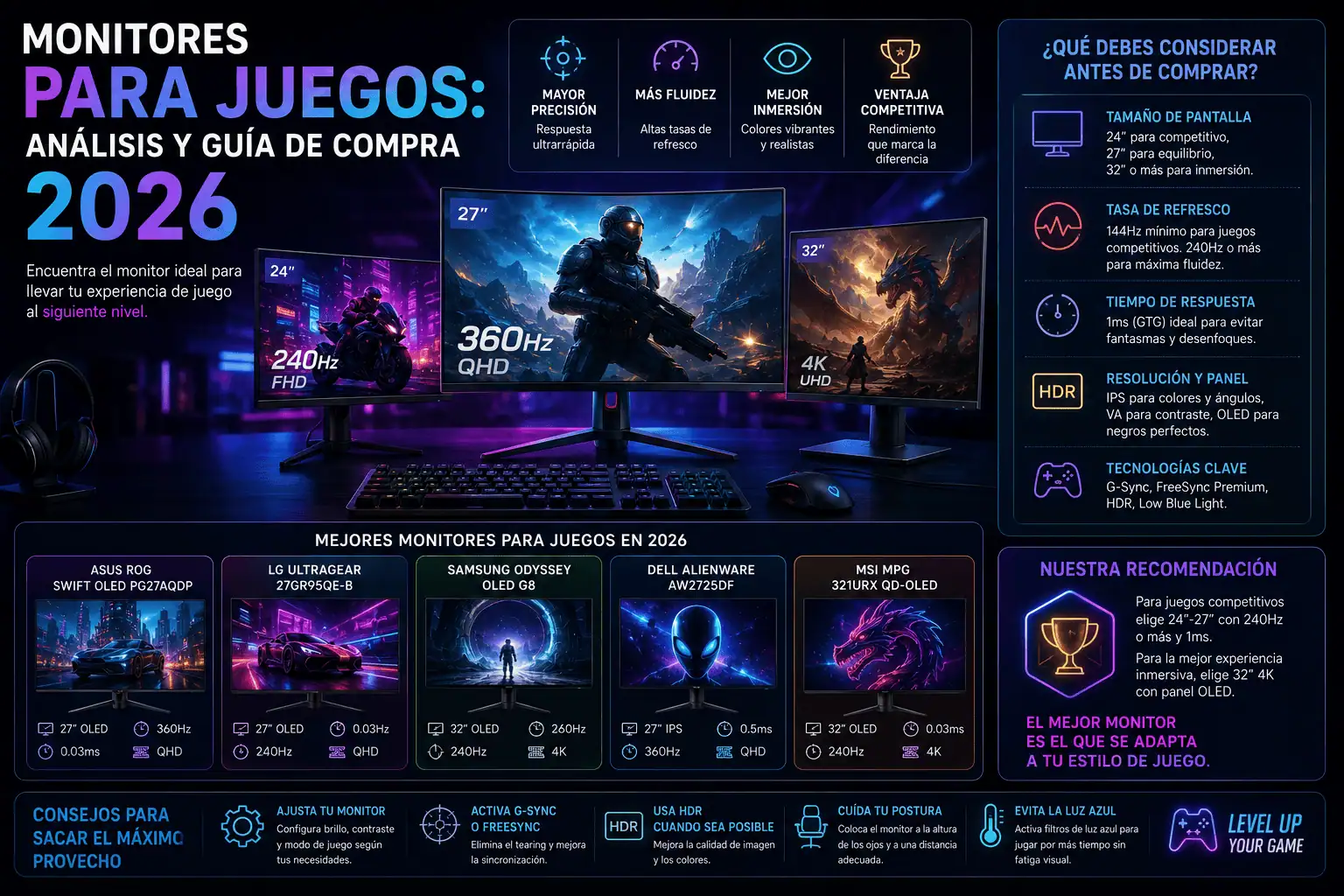
Monitores para juegos: Análisis y guía de compra 2026
Comprender el panorama: los avances tecnológicos que dan forma a los monitores para videojuegos
El mercado de monitores para juegos en 2026 se caracteriza por la convergencia de altas frecuencias de actualización, tecnologías de panel avanzadas y funciones sofisticadas diseñadas para los jugadores más exigentes. Atrás quedaron los días en que bastaba con conectar un monitor y esperar lo mejor. Ahora, comprender los matices de los tiempos de respuesta de los píxeles, las tecnologías de sincronización adaptativa y la precisión del color es crucial para maximizar la experiencia de juego. Antes de profundizar en recomendaciones específicas, analicemos los elementos clave que definen un monitor para juegos de alta gama en 2026.
Análisis en profundidad de la tecnología de paneles: IPS, VA y OLED
La tecnología del panel es fundamental para la calidad de imagen de cualquier monitor. Tres tecnologías predominan: IPS (In-Plane Switching), VA (Vertical Alignment) y OLED (Organic Light-Emitter Diode). Cada una posee ventajas y desventajas únicas que se adaptan a las diferentes prioridades de los jugadores.
- IPS (In-Plane Switching): Reconocida por su precisión de color superior y amplios ángulos de visión, la tecnología IPS sigue siendo una opción popular. Los paneles IPS modernos ofrecen tiempos de respuesta impresionantemente bajos, comparables a las antiguas tecnologías TN (Twisted Nematic), lo que los hace ideales para juegos de acción trepidantes. IPS destaca en títulos con colores intensos, ofreciendo imágenes vibrantes y precisas. Para un rendimiento óptimo, busca monitores IPS con tiempos de respuesta anunciados de 1 ms o menos. Sin embargo, los paneles IPS a veces pueden sufrir el efecto de “brillo IPS”, una sutil fuga de luz de fondo visible en escenas oscuras, especialmente en las esquinas de la pantalla.
- Paneles VA (Alineación Vertical): Los paneles VA son reconocidos por sus excepcionales relaciones de contraste, que producen negros más profundos y una experiencia visual más inmersiva, especialmente en juegos oscuros y atmosféricos. Si bien históricamente se criticaba a los paneles VA por sus tiempos de respuesta más lentos y el efecto fantasma perceptible, los avances han mejorado significativamente su rendimiento. Los paneles VA de gama alta ahora ofrecen tiempos de respuesta comparables a los IPS, aunque podrían presentar un efecto fantasma ligeramente mayor en ciertos escenarios. Si priorizas el alto contraste y los negros profundos para títulos como juegos de terror o simuladores espaciales, un panel VA bien ajustado es una opción atractiva.
- OLED (Organic Light-Emitting Diode): Emerging as the undisputed king of image quality, OLED technology offers per-pixel illumination, meaning each pixel emits its own light. This translates to infinite contrast ratios, perfect blacks, and incredibly vibrant colors. OLED monitors deliver unparalleled immersion and realism. Response times are virtually instantaneous, eliminating motion blur and ghosting entirely. However, OLED technology comes at a premium price. Furthermore, “burn-in,” the potential for permanent image retention, remains a concern, though manufacturers are implementing mitigation strategies like pixel shifting and screen savers. For gamers seeking the absolute best image quality and responsiveness, OLED is the ultimate choice, provided they’re mindful of potential burn-in risks.
Resolution and Refresh Rate: The Sweet Spot for Performance
Resolution dictates the sharpness and detail of the image, while refresh rate determines the smoothness of motion. Finding the right balance depends on your gaming PC’s capabilities and your preferred gaming genres.
- 1080p (1920×1080): Still a viable option for budget-conscious gamers, 1080p monitors are readily available at high refresh rates (144Hz, 240Hz, or even 360Hz). They require less powerful hardware to drive, making them ideal for gamers with mid-range graphics cards focused on competitive esports titles.
- 1440p (2560×1440): The current sweet spot for many gamers, 1440p offers a significant step up in image clarity compared to 1080p, without demanding the extreme horsepower required for 4K. 1440p monitors are widely available with high refresh rates (144Hz, 165Hz, 240Hz), providing a smooth and detailed gaming experience. This resolution is well-suited for a broad range of games, from AAA titles to competitive shooters.
- 4K (3840×2160): Delivering the highest level of detail and sharpness, 4K monitors offer a stunning visual experience. However, driving games at 4K resolution with high refresh rates requires a powerful gaming PC equipped with a high-end graphics card. 4K monitors are best suited for gamers who prioritize visual fidelity and enjoy slower-paced, visually rich games. While 144Hz 4K monitors are becoming more common, they remain relatively expensive.
- Refresh Rate: Measured in Hertz (Hz), refresh rate determines how many times per second the monitor updates its image. Higher refresh rates result in smoother motion and reduced motion blur, providing a competitive advantage in fast-paced games. 144Hz is generally considered the minimum for serious gamers, while 240Hz and 360Hz offer even smoother motion, though the benefits become less noticeable beyond a certain point.
Adaptive Sync Technology: Eliminating Screen Tearing
Adaptive sync technology dynamically adjusts the monitor’s refresh rate to match the frame rate output of your graphics card, eliminating screen tearing and stuttering. Two dominant adaptive sync technologies are available:
- NVIDIA G-Sync: Developed by NVIDIA, G-Sync requires a compatible NVIDIA graphics card and a G-Sync-enabled monitor. G-Sync monitors feature a dedicated module that ensures precise synchronization between the graphics card and the display. This results in a tear-free and smooth gaming experience, even when frame rates fluctuate.
- AMD FreeSync: Developed by AMD, FreeSync is an open-source technology that is compatible with AMD graphics cards and FreeSync-enabled monitors. FreeSync utilizes the VESA Adaptive-Sync standard, making it a more cost-effective solution than G-Sync. FreeSync also offers a range of certifications, including FreeSync Premium and FreeSync Premium Pro, which guarantee specific performance levels and features.
HDR (High Dynamic Range): Expanding the Color Palette
HDR technology expands the range of colors and contrast that a monitor can display, resulting in a more vibrant and realistic image. However, not all HDR implementations are created equal. Look for monitors with VESA DisplayHDR certifications, such as DisplayHDR 600 or DisplayHDR 1000, which guarantee specific levels of brightness and color gamut coverage. True HDR requires high peak brightness, wide color gamut coverage, and local dimming capabilities.
Ergonomics and Features: Comfort and Convenience
Beyond image quality and performance, consider the ergonomics and features of the monitor. Adjustable stands that allow for height, tilt, and swivel adjustments are crucial for comfortable viewing over long gaming sessions. Built-in speakers, USB hubs, and headphone jacks can also enhance convenience.
Connectivity: Ports and Compatibility
Ensure the monitor has the necessary ports to connect to your gaming PC and other devices. Common ports include HDMI, DisplayPort, and USB. DisplayPort is generally preferred for high refresh rates and resolutions.
Brand Reputation and Warranty: Peace of Mind
Choose a monitor from a reputable brand known for quality and reliability. A comprehensive warranty is essential for protecting your investment against potential defects.
The Future of Gaming Monitors: What to Expect in 2026 and Beyond
El mercado de monitores para juegos continúa evolucionando rápidamente. Se esperan nuevos avances en la tecnología OLED, con pantallas de mayor tamaño y precios más bajos. La retroiluminación Mini-LED se generalizará, ofreciendo un contraste y brillo superiores a los de los paneles LCD tradicionales. Las frecuencias de actualización más altas, como 480 Hz y superiores, serán cada vez más comunes, satisfaciendo las exigencias de los jugadores de esports competitivos. Las tecnologías de visualización inalámbrica también seguirán mejorando, ofreciendo mayor flexibilidad y comodidad. Es probable que los monitores curvos sigan siendo populares, proporcionando una experiencia visual más inmersiva. En definitiva, el monitor ideal para juegos depende de tus necesidades y preferencias personales. Al comprender los factores clave que se analizan en esta guía, podrás tomar una decisión informada y elegir un monitor que mejorará tu experiencia de juego durante muchos años.