Las mejores aplicaciones de edición de fotos para iPhone: Captura imágenes impresionantes
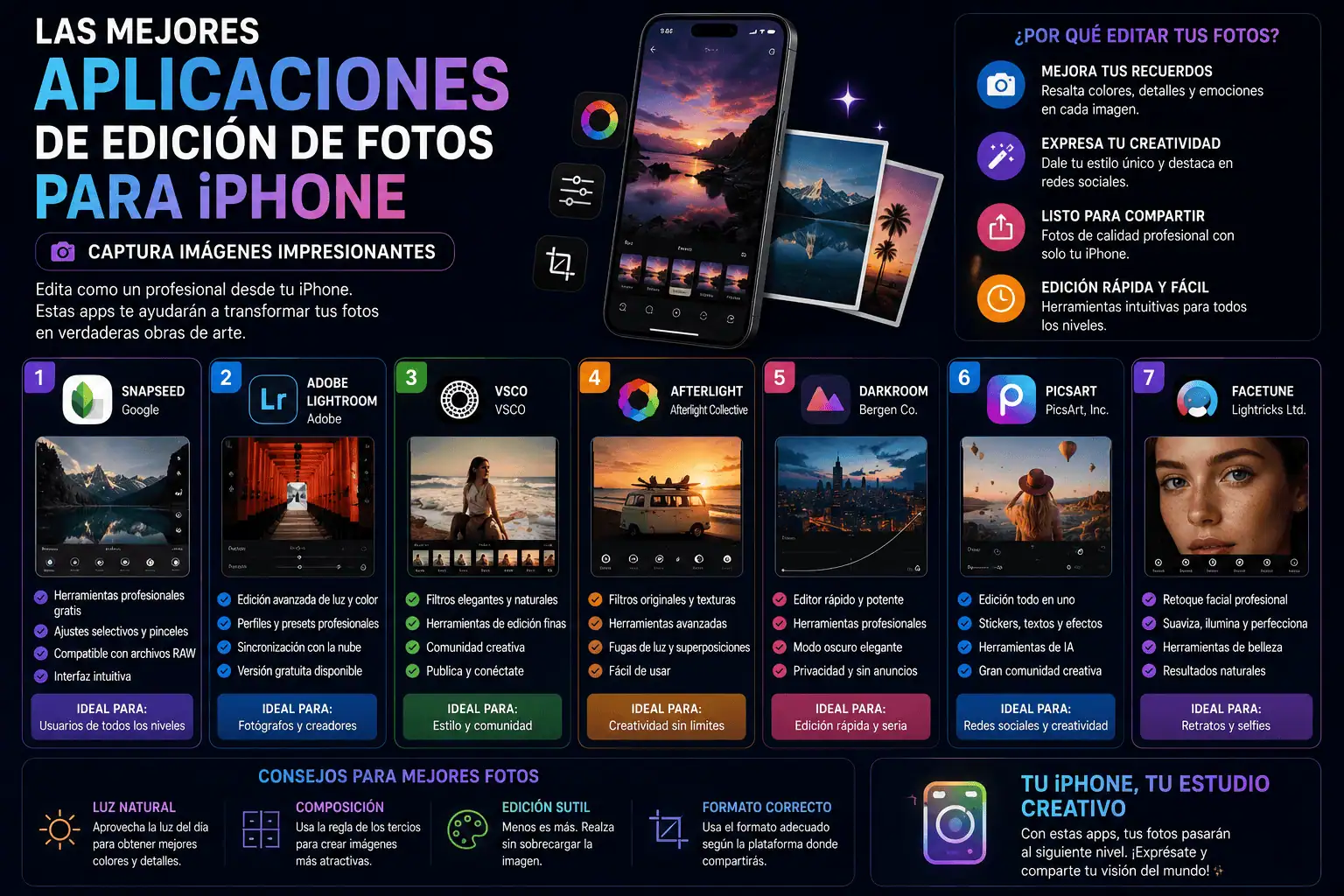
El iPhone ha revolucionado la fotografía móvil. Su potente cámara, junto con la disponibilidad de aplicaciones de edición, permite a cualquiera capturar y transformar momentos cotidianos en imágenes impactantes. Navegar por el vasto catálogo de editores de fotos de la App Store puede resultar abrumador. Esta guía analiza las mejores aplicaciones de edición de fotos para iPhone en diversas categorías, destacando sus características principales, sus puntos fuertes y el perfil de usuario ideal.
I. Equipos de alto rendimiento: Las suites de edición esenciales
Estas aplicaciones ofrecen un conjunto completo de herramientas, adecuadas tanto para principiantes como para fotógrafos experimentados. Proporcionan un control exhaustivo sobre los parámetros de la imagen, filtros sofisticados y herramientas creativas.
- Adobe Lightroom Mobile: La versión móvil del software estándar de la industria. Lightroom Mobile ofrece edición no destructiva, lo que significa que su foto original nunca se altera. Las características principales incluyen:
- Edición RAW: Importa y edita archivos RAW directamente en tu iPhone, conservando el máximo detalle de la imagen.
- Preajustes: Aplica estilos prediseñados a tus fotos con un solo toque o crea tus propios preajustes personalizados para lograr un estilo uniforme.
- Corrección de color: Ajuste con precisión los colores con los controles deslizantes HSL (Tono, Saturación, Luminosidad) y las ruedas de corrección de color para un control avanzado.
- Ajustes selectivos: Realice ediciones precisas en áreas específicas de su fotografía utilizando herramientas radiales, graduadas y de pincel.
- Corrección de perspectiva: Corrige líneas y perspectivas distorsionadas en fotografías de arquitectura y paisajes.
- Sincronización en la nube: Sincroniza tus ediciones sin problemas entre dispositivos de escritorio y móviles.
- Suscripción: Lightroom Mobile requiere una suscripción a Adobe Creative Cloud.
Usuario ideal: Profesionales y aficionados avanzados que exigen el máximo nivel de control y calidad de imagen, especialmente aquellos que trabajan con archivos RAW y están integrados en el ecosistema de Adobe.
- Snapseed: Un editor de fotos gratuito y potente desarrollado por Google. Snapseed cuenta con una interfaz fácil de usar y un conjunto de herramientas sorprendentemente completo. Sus características principales incluyen:
- Cepillo curativo: Elimina imperfecciones, distracciones y manchas con facilidad.
- Herramienta de selección: Ajusta con precisión el brillo, el contraste y la saturación en áreas específicas.
- Curvas: Ajusta con precisión el rango tonal y el contraste mediante ajustes de curvas exactos.
- HDR Scape: Mejora los detalles y el rango dinámico para lograr un efecto HDR espectacular.
- Doble exposición: Crea imágenes únicas y artísticas combinando dos fotografías.
- Filtros: Una amplia selección de filtros para diversos estilos, desde vintage hasta moderno.
- Herramienta de texto: Añade texto con fuentes y estilos personalizables.
- Free: Completely free with no in-app purchases or subscriptions.
Ideal User: Anyone looking for a free, powerful, and user-friendly photo editor for everyday enhancements and creative experimentation.
- VSCO: Known for its film-inspired filters and aesthetic community, VSCO provides a unique editing experience. Key features include:
- Film Emulation Presets: Recreate the look of classic film stocks with highly realistic presets.
- Advanced Controls: Fine-tune exposure, contrast, temperature, and more.
- HSL Color Tool: Adjust individual colors for precise control over your image’s palette.
- VSCO Community: Share your photos and connect with other photographers.
- Recipes: Save your favorite editing combinations as “recipes” to easily apply them to future photos.
- Membership: Offers both a free version with basic tools and a paid membership for access to the full preset library and advanced features.
Ideal User: Photographers interested in film aesthetics, curated presets, and a creative community.
II. Specialized Tools: Niche Editing Apps for Specific Needs
These apps excel in particular areas, offering specialized tools for portrait retouching, artistic effects, or lens correction.
- Facetune2: A powerful portrait editing app specifically designed for enhancing selfies and portraits. Key features include:
- Skin Smoothing: Achieve flawless skin with natural-looking smoothing tools.
- Eye Whitening & Enhancement: Brighten eyes and add sparkle.
- Face Reshaping: Subtly reshape facial features for a more flattering look.
- Makeup: Apply virtual makeup to enhance your features.
- Background Blur: Create a bokeh effect to isolate your subject.
- Subscription: Offers both a free version with basic tools and a paid subscription for access to all features.
Ideal User: Anyone who wants to enhance their selfies and portraits with realistic and subtle edits.
- TouchRetouch: A dedicated app for removing unwanted objects from photos. Key features include:
- Object Removal: Quickly and easily remove distractions like power lines, people, and blemishes.
- Line Removal: Remove unwanted lines from your photos.
- Clone Stamp: Duplicate and blend textures to seamlessly repair imperfections.
- Easy to Use: Intuitive interface with simple tools for quick and effective object removal.
- One-Time Purchase: No subscription required.
Ideal User: Photographers who need to remove distractions and imperfections from their images.
- SKRWT: Designed for correcting lens distortion and perspective issues in architectural and landscape photography. Key features include:
- Perspective Correction: Fix converging lines and perspective distortions.
- Lens Correction: Correct barrel and pincushion distortion caused by wide-angle lenses.
- Vignette Correction: Remove dark corners caused by lens vignetting.
- Grid Tools: Helps to align and straighten images.
- One-Time Purchase: No subscription required.
Ideal User: Architectural and landscape photographers who want to ensure their images are perfectly aligned and distortion-free.
III. Creative & Fun: Apps for Artistic Expression
These apps provide unique tools for creating artistic effects, adding text, and designing collages.
- PicsArt: A versatile photo editor with a vast library of stickers, filters, and collage templates. Key features include:
- Photo Editor: A full suite of editing tools, including filters, adjustments, and drawing tools.
- Stickers: A massive library of stickers to add fun and creativity to your photos.
- Collage Maker: Create custom collages with various layouts and backgrounds.
- Drawing Tools: Draw and paint directly on your photos.
- Effects: A wide range of artistic effects to transform your images.
- Subscription: Offers both a free version with limited features and a paid subscription for access to the full library and ad-free experience.
Ideal User: Social media users and creative individuals who want to add fun and artistic elements to their photos.
- Over: (Now part of GoDaddy Studio) An app for adding text, graphics, and logos to your photos. Key features include:
- Text Templates: A library of pre-designed text templates for creating professional-looking graphics.
- Graphic Assets: A wide range of graphics, icons, and illustrations to enhance your designs.
- Branding Tools: Create consistent branding across your social media platforms.
- Social Media Templates: Ready-made templates for Instagram, Facebook, and other platforms.
- Subscription: Offers both a free version with limited features and a paid subscription for access to the full library and advanced tools.
Ideal User: Small business owners, social media managers, and anyone who needs to create visually appealing graphics for marketing or personal use.
- Mextures: An app designed for adding textures, gradients, and light leaks to your photos. Key features include:
- Texture Overlays: A library of high-quality textures to add depth and character to your images.
- Modos de fusión: Experimenta con diferentes modos de fusión para lograr efectos únicos.
- Sistema de fórmulas: guarda tus combinaciones de edición favoritas como “fórmulas” y compártelas con otros usuarios.
- Compra única: No se requiere suscripción.
Usuario ideal: Fotógrafos que desean añadir texturas y efectos únicos y artísticos a sus fotos.
Elegir la aplicación de edición de fotos adecuada depende de tus necesidades y preferencias. Experimenta con diferentes aplicaciones para encontrar las que mejor se adapten a tu flujo de trabajo y estilo creativo. La potencia de la cámara del iPhone, combinada con estas excepcionales herramientas de edición, te permite capturar y crear fotografías realmente impresionantes.